

Why use it
Rankings change all the time, and it’s easy to miss it when a key page drops. The rank tracker keeps your important keywords in one place, shows which way each one moved, and charts your progress, so you can see what’s working and react quickly when something slides.How to use it
1
Open the Rank tracker
Choose Rank tracker in the sidebar, under Search (SEO).
2
Add a keyword
Choose Track New. Enter the keyword, and optionally a location (any country, region or city; if you leave it empty, your workspace’s default is used), a device (desktop or mobile), and whether to check it daily or weekly. Then choose Track keyword.
3
Watch it over time
Spyro AI checks the new keyword right away, and its first position appears as soon as it’s ready. Choose any keyword to see its full history chart.
What the table shows
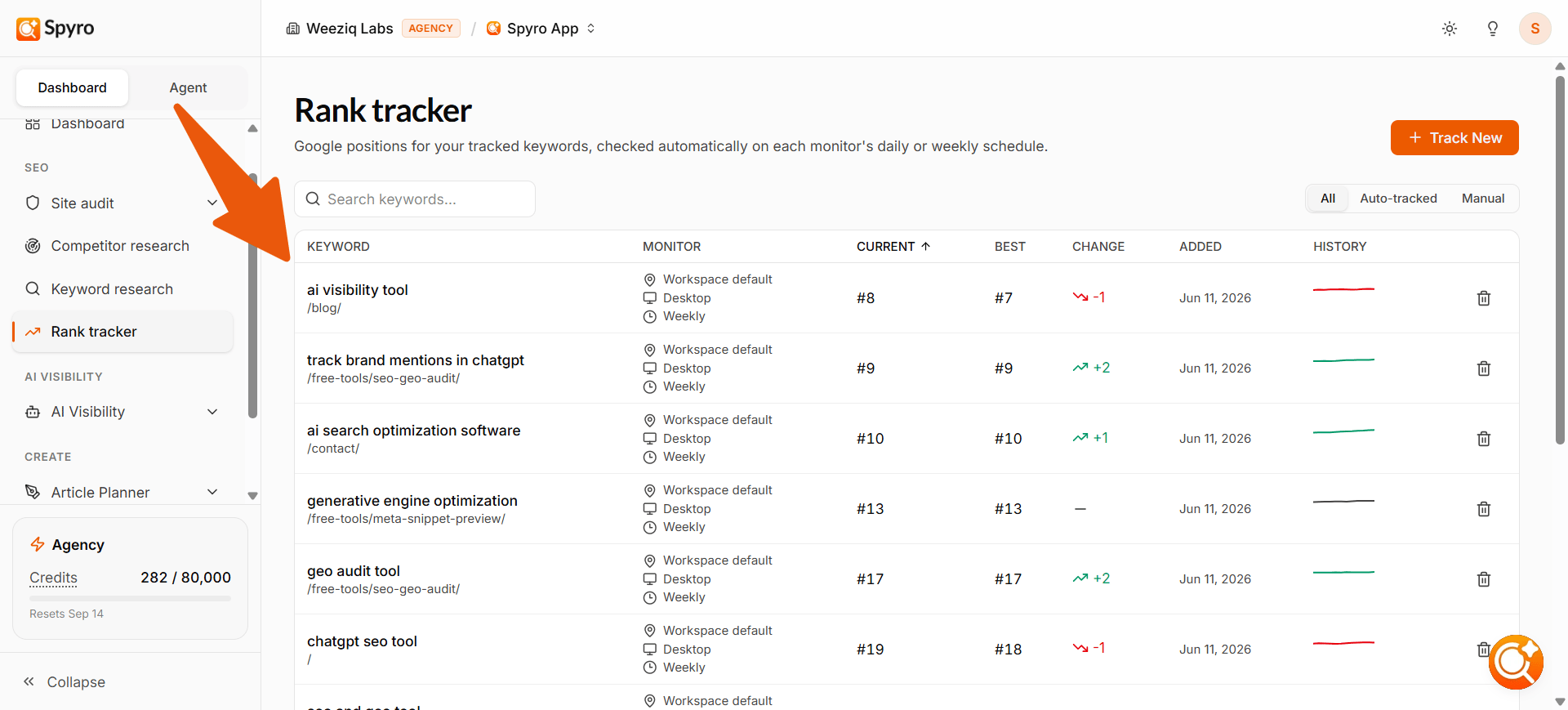
Each keyword you track gets its own row, with:- Keyword and the page of yours that ranks for it
- Monitor: the location, device and schedule (daily or weekly) it’s checked on
- Current: where you sit in Google right now
- Best: the best position you’ve reached
- Change: how far it moved since the last check (green up, red down)
- History: a small chart of recent checks
How often positions are checked
- New keywords are checked right away.
- Weekly keywords are re-checked every Monday at 02:00, in your workspace’s time zone.
- Daily keywords are re-checked every day at 02:00.
Automatic keyword tracking
Every time Spyro AI finishes writing an article, it automatically starts tracking the best keyword for it, and it’s smart about which one to pick. Instead of just grabbing the obvious keyword, Spyro AI chooses the one the article is most likely to actually rank for, based on how competitive the keyword is and how strong your site is:- On a strong, established site, it usually tracks the article’s main keyword, because you can realistically rank for it.
- On a newer site, it tracks an easier, more specific keyword first. As your site grows stronger, the bigger keyword becomes worth tracking later.
Good to know
- How many keywords you can track at once depends on your plan: 100 per workspace on Starter, 500 on Pro and 1,500 on Agency. Keywords Spyro AI adds automatically count too.
- Deleting a keyword frees its slot right away, so remove ones you no longer need.
- If you’re at the limit, Spyro AI tells you when you try to add another, and skips automatic tracking until you free up space.
Related
GSC & Bing
Compare tracked rankings with your real Google and Bing data.
Competitor research
Find keywords your competitors rank for and you don’t.
AI writer
Create content to rank for your priority keywords.
Site audit
Fix on-page and technical issues that affect your rankings.